If you need to make this change on the Terminal Server jump to Step 2.
STEP 1
- Copy two .dll files from W:Installer\PDF_Fix OR from article attachments

- Paste these into C:\Pfx Engagement\WM\ (If you want, replace files if they are there)
- Type cmd in start menu
- With cmd still in the start menu, press control+shift+enter at the same time
- in the command prompt copy and paste this: cd c:\pfx engagement\wm\
- Press enter
- Then paste this in the command prompt: installamyuniprinters
- Press enter
- Follow the prompts
STEP 2
- Go to printers

- Find this printer
- Click manage on this printer

- multiple pdf printers are managed from this printer. You will want to change the drivers for two PDF printers.
- Click properties and change the print drivers for BOTH Workstation to PDF Converter AND CCH Prosystem fx Engagement PDF Converter
 AND
AND 
- Under the Advanced Tab, Select the Amyuni 400 print driver
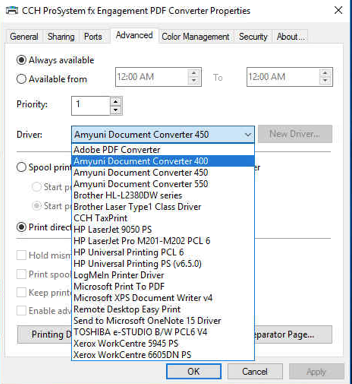
- Change the Print Driver to 400 for BOTH the Workstation to PDF converter and the CCH Prosystem fx Engagement converter, click apply after both driver changes.
- Restart (you need to restart for this one)
0 Comments