First option
Open excel, then go to file -> options -> add-ins
Select Manage: COMs under dropdown box
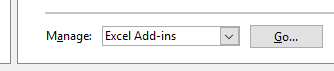
Then click go
Checkmark the Pfx.Ribbon.ExcelAddIn to make it active
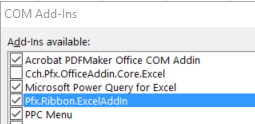
If that does not work, try a reinstall with the below instructions
Second Option
Close all applications (INCLUDING EXCEL)
- Go to add remove programs
- Remove Pfx.Ribbon.ExcelAddIn

- Reinstall add in by going to C:\Pfx Engagement\WM
- Double click to run Pfx.Ribbon.ExcelAddIn

- Reboot or logoff (required)
0 Comments